> ## Documentation Index
> Fetch the complete documentation index at: https://docs.ahaslides.com/llms.txt
> Use this file to discover all available pages before exploring further.
# 隐藏 AhaSlides 品牌链接
> 了解如何隐藏演示结束时显示给观众的“Get AhaSlides for free”注册链接。这是付费计划的品牌选项。
演示结束时,观众的手机上会显示一条简短的消息,内容为
**“Thank you for your participation ❤️ — Get AhaSlides for free”**。
其中 **Get AhaSlides for free** 是一个注册链接,邀请观众
创建自己的 AhaSlides 账户。您可以在演示文稿设置中关闭此链接。
隐藏 AhaSlides 链接是**付费计划**提供的品牌选项。如果
您使用的是免费计划,尝试更改时会看到升级提示。
## 什么是 AhaSlides 链接
观众在自己的设备上完成演示时,AhaSlides 会显示
一个结束画面,其中有感谢信息和 **Get AhaSlides for free** 链接。
该链接指向 AhaSlides 注册页面。它默认开启,以便新
观众发现 AhaSlides,但您可以将其移除,让结尾更简洁、
不带品牌标识。
## 隐藏 AhaSlides 链接
在 AhaSlides 编辑器中,打开设置菜单,进入 **高级** (Advanced)
选项卡。
找到 **Manage AhaSlides link at the end** 并取消勾选。观众将不会
再在演示结束时看到 **Get AhaSlides for free** 链接。
如需恢复该链接,请再次勾选 **Manage AhaSlides link at the end**。
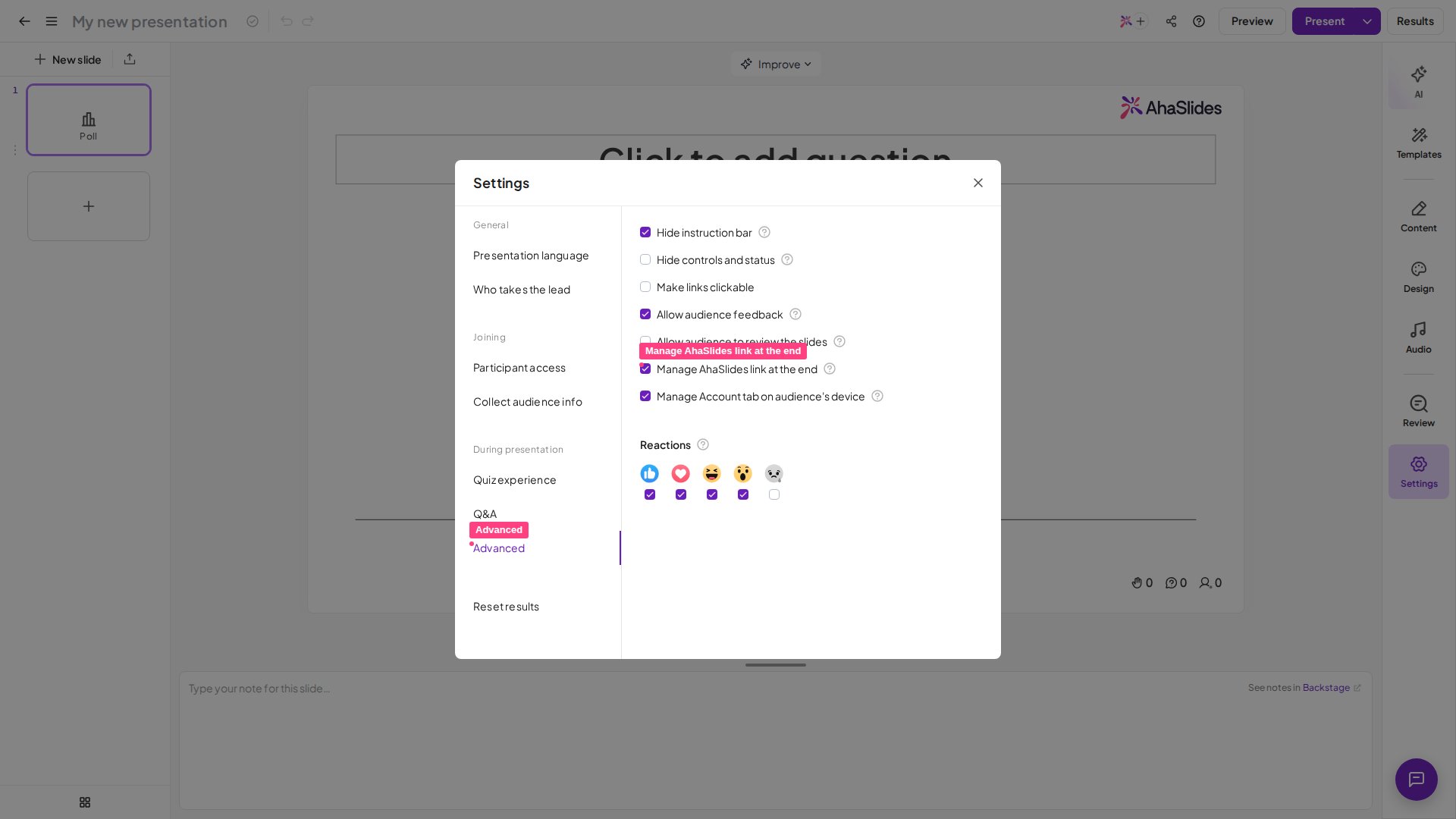 将鼠标悬停在该设置旁边的问号图标上,会显示提示:“Presenters can hide or show the AhaSlides link at the end of the presentation.”
## 常见问题
该链接默认开启。请使用设置菜单 **高级** (Advanced) 选项卡上的
**Manage AhaSlides link at the end** 设置将其关闭。如果该
设置被锁定并提示您升级,说明您当前的计划不包含隐藏链接
功能,它仅在付费计划中提供。
不会。此设置仅控制 **Get AhaSlides for free** 注册链接。
演示结束时显示给观众的感谢信息会保持不变。
想了解其他品牌设置?
* 如需移除或替换每张幻灯片右上角的徽标,请参阅[移除和更改徽标](/cn/branding/removing-and-changing-the-logo)。
* 如需自定义演示文稿的颜色、字体和背景,请参阅[设计您的主题](/cn/branding/design-your-theme-on-ahaslides)。
仍然无法解决?请发送电子邮件至 [hi@ahaslides.com](mailto:hi@ahaslides.com),我们很乐意提供帮助。
This documentation is built and hosted on [Mintlify](https://mintlify.com), a developer documentation platform.
将鼠标悬停在该设置旁边的问号图标上,会显示提示:“Presenters can hide or show the AhaSlides link at the end of the presentation.”
## 常见问题
该链接默认开启。请使用设置菜单 **高级** (Advanced) 选项卡上的
**Manage AhaSlides link at the end** 设置将其关闭。如果该
设置被锁定并提示您升级,说明您当前的计划不包含隐藏链接
功能,它仅在付费计划中提供。
不会。此设置仅控制 **Get AhaSlides for free** 注册链接。
演示结束时显示给观众的感谢信息会保持不变。
想了解其他品牌设置?
* 如需移除或替换每张幻灯片右上角的徽标,请参阅[移除和更改徽标](/cn/branding/removing-and-changing-the-logo)。
* 如需自定义演示文稿的颜色、字体和背景,请参阅[设计您的主题](/cn/branding/design-your-theme-on-ahaslides)。
仍然无法解决?请发送电子邮件至 [hi@ahaslides.com](mailto:hi@ahaslides.com),我们很乐意提供帮助。
This documentation is built and hosted on [Mintlify](https://mintlify.com), a developer documentation platform.