> ## Documentation Index
> Fetch the complete documentation index at: https://docs.ahaslides.com/llms.txt
> Use this file to discover all available pages before exploring further.
# 使用观众验证
> 为每位观众分配专属口令以加入您的演示,非常适合售票活动。并非所有计划都可用。
观众验证功能可让您向观众发放口令。每位观众输入各自专属的口令即可加入您的演示,这对售票活动尤其有用。
此功能并非在所有计划中都可用;如果您的计划不包含此功能,系统会提示您升级。
## 设置观众验证
在演示文稿编辑器中,点击右侧工具栏中的 **设置** (Settings) 图标,打开 **参与者访问** (Participant access) 选项卡,然后选择 **参与者必须输入密码才能加入** (Participants must enter passcode to join)。
输入**您的演示将有多少位参与者**。如果不确定具体人数,建议多估算一些,这样才有足够的验证码可以发放。
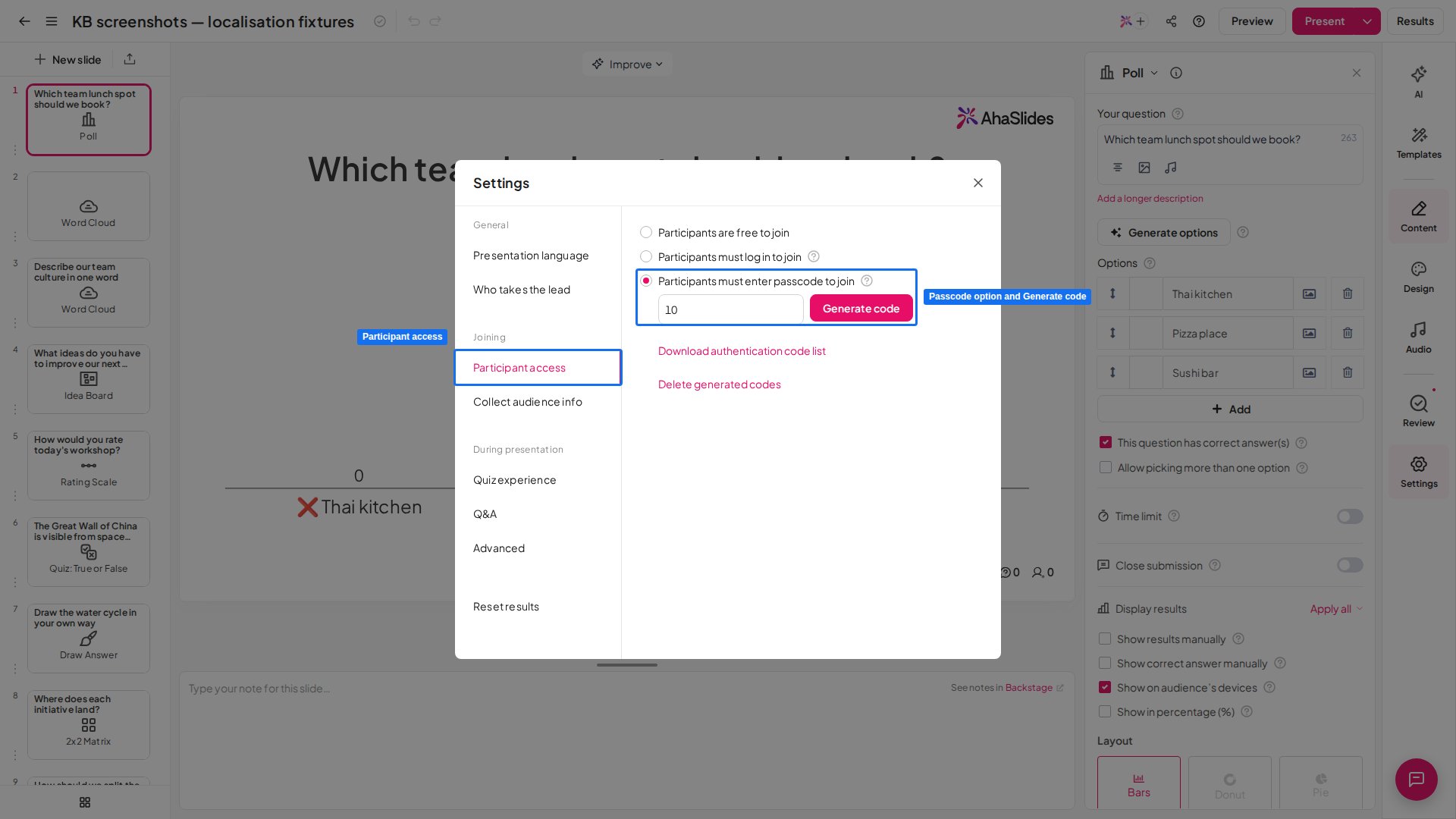 点击 **生成代码** (Generate code) 按钮。这会下载一份 Excel 表格,列出您演示的所有验证码。
接下来,您可以为每位参与者分发一个验证码。参与者通过[网址链接或二维码](/cn/presenting/sharing-your-presentation-for-participants-to-join)访问您的演示后,需要输入验证码才能加入。
每个验证码只能由**一位参与者**使用。
## 关闭观众验证
要让参与者再次无需口令即可加入,请在 **设置** (Settings) 中打开 **参与者访问** (Participant access) 选项卡,然后选择 **参与者可以自由加入** (Participants are free to join)。
## 重新下载验证码列表
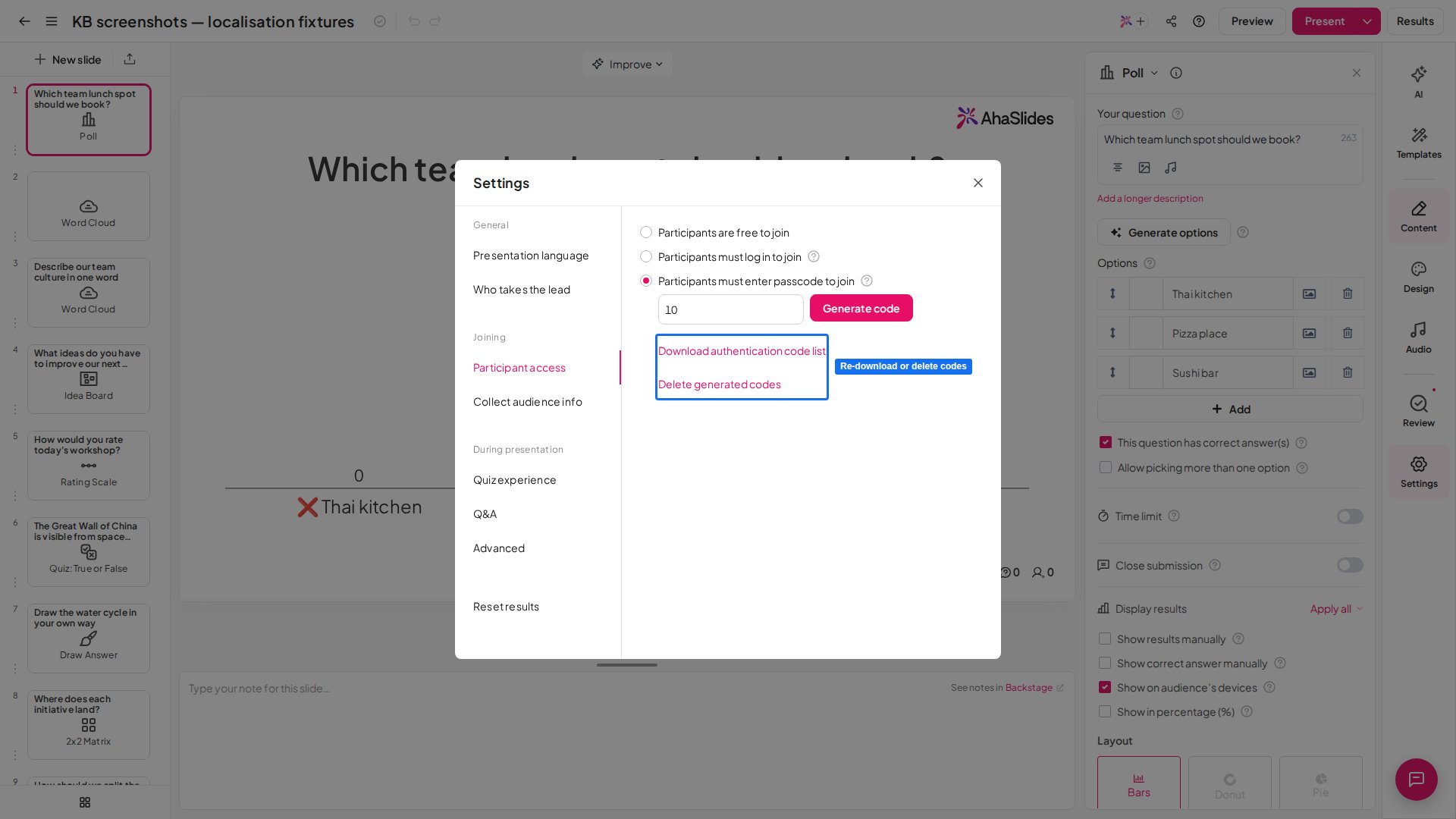
如果需要再次下载验证码列表,请在 **设置** (Settings) 中打开 **参与者访问** (Participant access) 选项卡,然后点击 **下载验证码列表** (Download authentication code list)。这样您会获得另一份验证码列表,其中包含您演示的所有有效验证码(在您重置或删除之前,这些验证码一直有效)。
点击 **生成代码** (Generate code) 按钮。这会下载一份 Excel 表格,列出您演示的所有验证码。
接下来,您可以为每位参与者分发一个验证码。参与者通过[网址链接或二维码](/cn/presenting/sharing-your-presentation-for-participants-to-join)访问您的演示后,需要输入验证码才能加入。
每个验证码只能由**一位参与者**使用。
## 关闭观众验证
要让参与者再次无需口令即可加入,请在 **设置** (Settings) 中打开 **参与者访问** (Participant access) 选项卡,然后选择 **参与者可以自由加入** (Participants are free to join)。
## 重新下载验证码列表
如果需要再次下载验证码列表,请在 **设置** (Settings) 中打开 **参与者访问** (Participant access) 选项卡,然后点击 **下载验证码列表** (Download authentication code list)。这样您会获得另一份验证码列表,其中包含您演示的所有有效验证码(在您重置或删除之前,这些验证码一直有效)。
 ## 重置或删除验证码
您也可以在 **参与者访问** (Participant access) 选项卡中重置或删除验证码:
1. **重置验证码列表**:在输入框中填入新的参与者人数,然后再次点击 **生成代码** (Generate code)。
2. **删除验证码列表**:点击 **删除生成的代码** (Delete generated codes) 选项。
**有疑问?**
请联系我们的支持团队:如果您已登录,请使用控制面板右下角的聊天图标;如果尚未登录,请[在此联系我们](https://ahaslides.com/contact-us/),或发送邮件至 [hi@ahaslides.com](mailto:hi@ahaslides.com)。
想与其他用户交流?欢迎加入 [AhaSlides 社区](https://community.ahaslides.com/),分享使用技巧、提出功能建议,了解其他人如何与观众互动。
This documentation is built and hosted on [Mintlify](https://mintlify.com), a developer documentation platform.
## 重置或删除验证码
您也可以在 **参与者访问** (Participant access) 选项卡中重置或删除验证码:
1. **重置验证码列表**:在输入框中填入新的参与者人数,然后再次点击 **生成代码** (Generate code)。
2. **删除验证码列表**:点击 **删除生成的代码** (Delete generated codes) 选项。
**有疑问?**
请联系我们的支持团队:如果您已登录,请使用控制面板右下角的聊天图标;如果尚未登录,请[在此联系我们](https://ahaslides.com/contact-us/),或发送邮件至 [hi@ahaslides.com](mailto:hi@ahaslides.com)。
想与其他用户交流?欢迎加入 [AhaSlides 社区](https://community.ahaslides.com/),分享使用技巧、提出功能建议,了解其他人如何与观众互动。
This documentation is built and hosted on [Mintlify](https://mintlify.com), a developer documentation platform.