> ## Documentation Index
> Fetch the complete documentation index at: https://docs.ahaslides.com/llms.txt
> Use this file to discover all available pages before exploring further.
# 複数アカウントと Enterprise ライセンス
> チーム向けに AhaSlides のライセンスを複数購入したい、または Enterprise プランをご希望ですか?複数アカウント向けのチームプランと Enterprise をご案内します。
## 複数アカウントとチームアカウント
複数のメンバーに有料機能を提供するには、1 人につき 1 ライセンスの Team プランを購入します。個人プランはご自身のアカウントのみをアップグレードするため、同僚の分はカバーされません。
ライセンスを購入するには、[料金ページ](https://ahaslides.com/pricing/)を開き、チームプランのセクションまでスクロールします。必要なライセンス数を入力してプランを選び、**今すぐ購入** (Buy now) をクリックします。[Team Members](https://presenter.ahaslides.com/apps/team/members) ページの **チームプランをアップグレード** (Upgrade team plan) をクリックすることもできます(チームが有料のチームプランに加入済みの場合、このボタンは **Buy licences** と表示されます)。
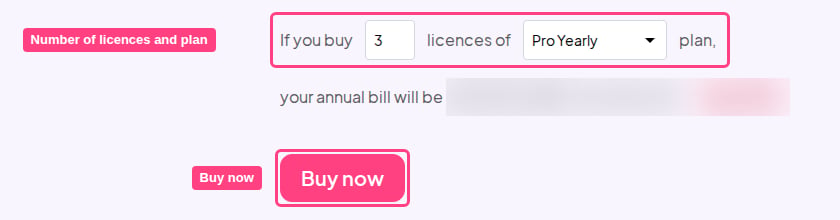 Team プランのライセンスの購入と変更について、手順を詳しく説明したガイドです。
## Enterprise
Enterprise プランやカスタムライセンスについては、[ahaslides.com/enterprise](https://ahaslides.com/enterprise/) をご覧ください。オプションをご確認いただけるほか、お問い合わせフォームからご連絡いただけます。
Team プランのライセンスの購入と変更について、手順を詳しく説明したガイドです。
## Enterprise
Enterprise プランやカスタムライセンスについては、[ahaslides.com/enterprise](https://ahaslides.com/enterprise/) をご覧ください。オプションをご確認いただけるほか、お問い合わせフォームからご連絡いただけます。
 **ご質問はありますか?**
サポートチームまでお問い合わせください。ログイン済みの場合はダッシュボード右下のチャットアイコンから、ログインしていない場合は[こちらからお問い合わせ](https://ahaslides.com/contact-us/)いただくか、[hi@ahaslides.com](mailto:hi@ahaslides.com) までメールをお送りください。
他のユーザーと交流したい方は、[AhaSlides コミュニティ](https://community.ahaslides.com/)に参加して、コツを共有したり、機能をリクエストしたり、他の人がどのように聴衆を巻き込んでいるかを確認しましょう。
This documentation is built and hosted on [Mintlify](https://mintlify.com), a developer documentation platform.
**ご質問はありますか?**
サポートチームまでお問い合わせください。ログイン済みの場合はダッシュボード右下のチャットアイコンから、ログインしていない場合は[こちらからお問い合わせ](https://ahaslides.com/contact-us/)いただくか、[hi@ahaslides.com](mailto:hi@ahaslides.com) までメールをお送りください。
他のユーザーと交流したい方は、[AhaSlides コミュニティ](https://community.ahaslides.com/)に参加して、コツを共有したり、機能をリクエストしたり、他の人がどのように聴衆を巻き込んでいるかを確認しましょう。
This documentation is built and hosted on [Mintlify](https://mintlify.com), a developer documentation platform.