> ## Documentation Index
> Fetch the complete documentation index at: https://docs.ahaslides.com/llms.txt
> Use this file to discover all available pages before exploring further.
# 이메일 및 뉴스레터 수신 거부
> 내 프로필의 이메일 설정에서 원하지 않는 이메일 유형을 끄면 AhaSlides 마케팅 이메일을 언제든지 수신 거부할 수 있습니다.
AhaSlides의 이메일을 더 이상 받고 싶지 않으시다면 언제든지 메일링 리스트에서 수신을 거부할 수 있습니다.
## 마케팅 이메일 수신 거부
마케팅 이메일 수신을 중단하려면 계정에서 직접 이메일 설정을 변경하세요.
로그인한 뒤 계정 메뉴에서 **내 프로필** (My Profile)을 엽니다.
**이메일 설정** (Email preferences) 섹션까지 스크롤합니다.
이메일 유형마다 별도의 토글이 있습니다. **새로운 기능 업데이트 및 유용한 팁** (Feature updates and protips), **일반적인 유용한 콘텐츠** (General useful content), **특별 할인 및 프로모션** (Special deals and promotions)입니다. 더 이상 받고 싶지 않은 항목을 끄세요.
**변경 사항 저장** (Save changes)을 클릭하면 모든 설정이 끝납니다!
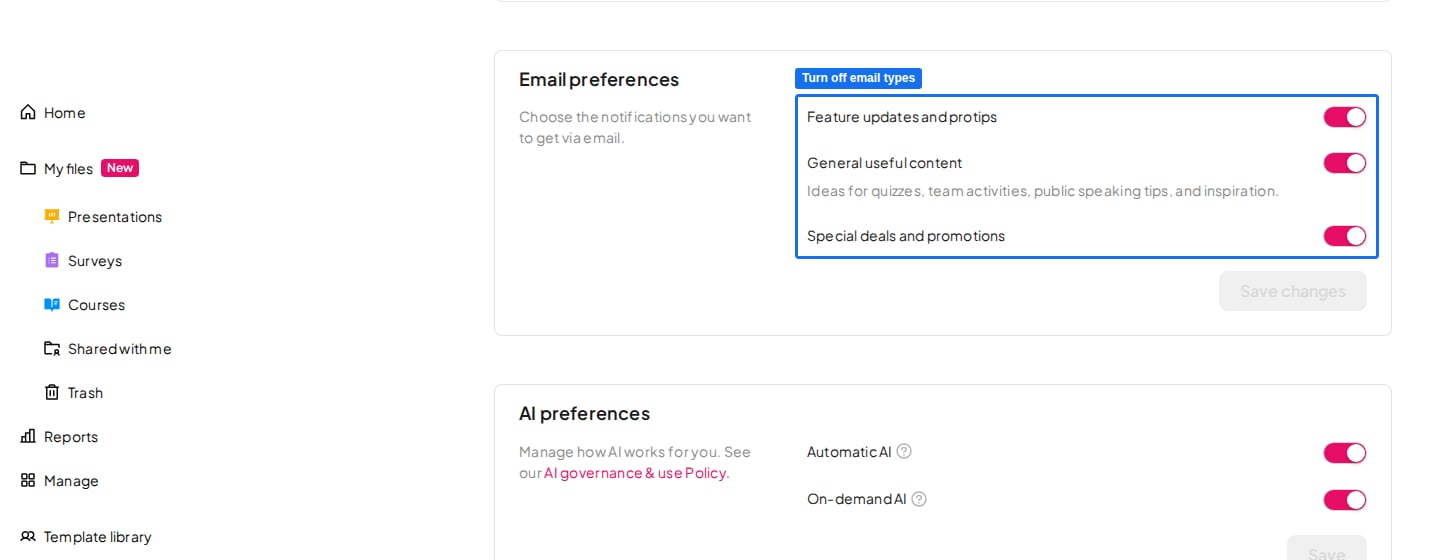 언제든지 **이메일 설정** (Email preferences)으로 돌아가 이메일 유형을 다시 켤 수 있습니다.
**궁금한 점이 있으신가요?**
지원팀에 문의해 주세요. 로그인한 상태라면 대시보드 오른쪽 아래의 채팅 아이콘을 사용하시고, 그렇지 않다면 [여기에서 문의하시거나](https://ahaslides.com/contact-us/) [hi@ahaslides.com](mailto:hi@ahaslides.com)으로 이메일을 보내 주세요.
다른 사용자와 소통하고 싶으신가요? [AhaSlides 커뮤니티](https://community.ahaslides.com/)에 참여해 팁을 공유하고, 기능을 제안하고, 다른 사람들이 청중의 참여를 이끄는 방법을 살펴보세요.
This documentation is built and hosted on [Mintlify](https://mintlify.com), a developer documentation platform.
언제든지 **이메일 설정** (Email preferences)으로 돌아가 이메일 유형을 다시 켤 수 있습니다.
**궁금한 점이 있으신가요?**
지원팀에 문의해 주세요. 로그인한 상태라면 대시보드 오른쪽 아래의 채팅 아이콘을 사용하시고, 그렇지 않다면 [여기에서 문의하시거나](https://ahaslides.com/contact-us/) [hi@ahaslides.com](mailto:hi@ahaslides.com)으로 이메일을 보내 주세요.
다른 사용자와 소통하고 싶으신가요? [AhaSlides 커뮤니티](https://community.ahaslides.com/)에 참여해 팁을 공유하고, 기능을 제안하고, 다른 사람들이 청중의 참여를 이끄는 방법을 살펴보세요.
This documentation is built and hosted on [Mintlify](https://mintlify.com), a developer documentation platform.