

Before you start
- You need to be logged in to your AhaSlides account.
- The AI Panel is an on-demand AI feature. If you or your team admin have turned On-demand AI off, the Create a new presentation with AI box doesn’t show on Home and the AI button in the editor is inactive. See How AhaSlides uses AI to switch it back on.
Create a presentation with AI from Home
1
Go to Home
Click Home in the left sidebar. The Create a new presentation with AI box sits at the top of the page.
2
Describe the presentation you want
Type what the presentation is for, who it’s for and how long it should run, in at least 3 characters. You can also click a suggestion under the box, such as Classroom icebreaker, Onboarding new members or General knowledge quiz, and edit it before you send it.To build from your own material, click the paperclip button and attach a file.
3
Send your prompt
Press Enter or click the arrow button. AhaSlides creates a new presentation, opens it in the editor with the AI Panel already open, and generates the slides there, with a mix of slide types.
4
Review and refine
Check the slides, then keep chatting in the AI Panel to change anything, or edit the slides yourself.
Use the AI Panel in the editor
1
Open a presentation
Start a new presentation, or open an existing one where you want to use the AI Panel.
2
Open the AI Panel
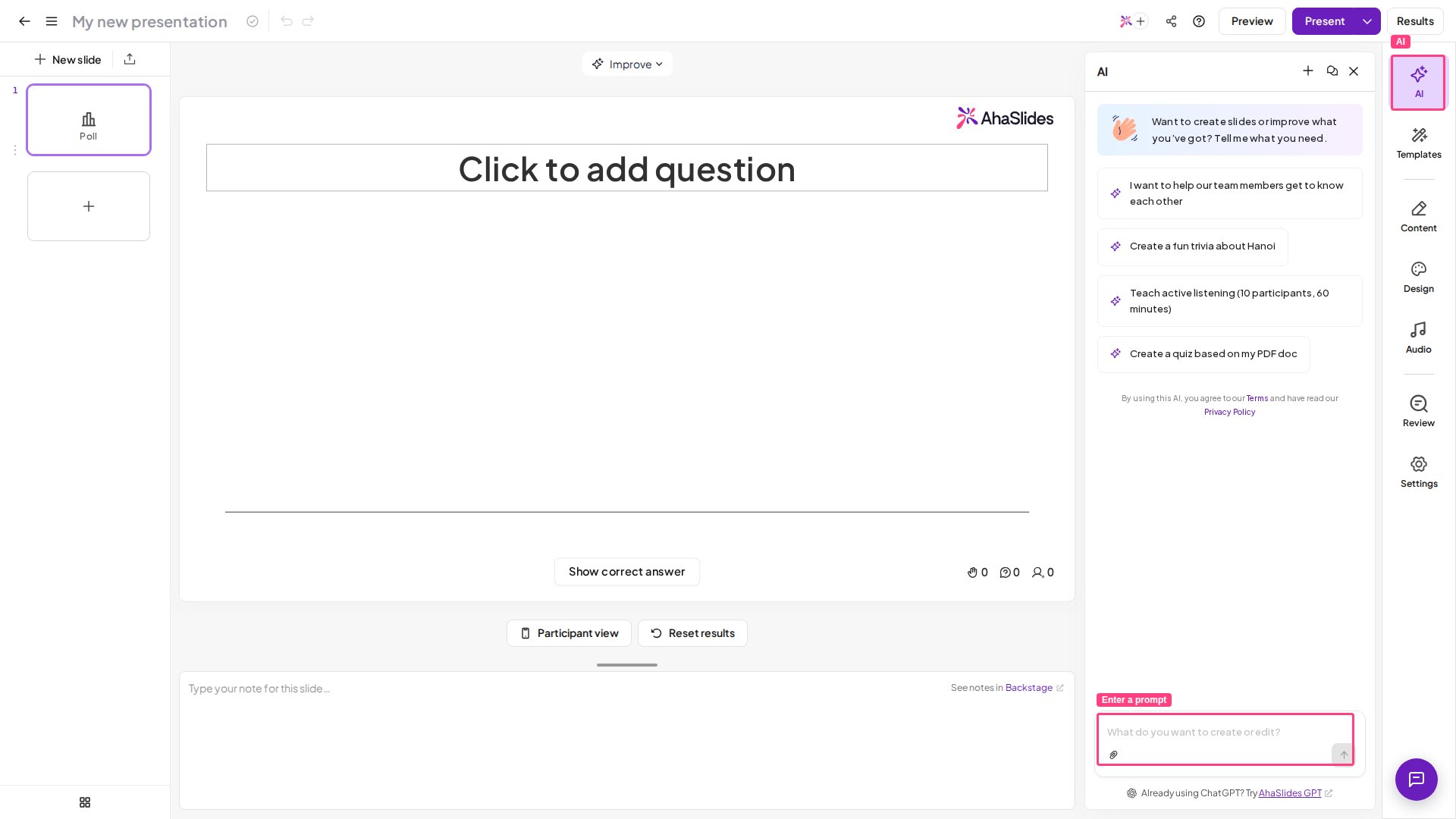
Click AI at the top of the toolbar on the far right of the editor, above Templates and Content. The AI Panel isn’t listed in the + New slide menu, so open it from here.
3
Enter a prompt
Type instructions describing the slides you want the AI to create or edit for you, or pick one of the ready-made prompts in the panel.You can start a new conversation, or reopen previous conversations, using the buttons in the panel.
What you can ask the AI Panel to do
- Build a whole presentation from a topic, for example “a 20-minute team icebreaker with a Poll, a Quiz and a Word Cloud”.
- Add slides to the presentation you have open.
- Change slides you’ve already made, for example rewriting the text on a slide.
- Handle several changes in one request. You can give it a multi-step instruction, such as “add three quiz questions about the water cycle, then add a summary slide at the end”, and it works through each step.
Does the AI Panel add images to slides?
Yes, where a slide needs a visual. The AI Panel adds stock photos from Unsplash to the slides it generates — it doesn’t create AI-generated images, and not every slide gets one. If you want a particular picture, add or replace it yourself in the editor after the slides are generated. Image licences and credits are covered in Image library and image credits.Build slides from other AI assistants
The AI Panel lives inside AhaSlides. If you’d rather work from an AI assistant you already use, AhaSlides also connects to external tools that build slides straight into your account:- AhaSlides MCP — connect Claude and other MCP-compatible assistants to create and edit AhaSlides decks by chatting.
- AhaSlides GPT — the official custom GPT in the ChatGPT store, available from the Marketplace as ChatGPT under Generative AI tools in your AhaSlides account.
Frequently asked questions
Which language does the AI Panel write in?
Which language does the AI Panel write in?
By default, it replies and builds slides in the language you write your prompt in. To get a different language, either write your prompt in that language or name it in your prompt, for example “add two slides introducing Paris, generate them in French”.
Is the AI Panel the same as the help chat?
Is the AI Panel the same as the help chat?
No. The AI Panel builds and edits your slides. The chat bubble at the bottom right of the app opens the AI assistant, which answers questions about using AhaSlides and can put you in touch with our support team.