

AI-powered features in AhaSlides
AhaSlides’ AI-powered features include:- AI Panel — create and edit slides from a text prompt, from the box at the top of Home or from AI in the editor. It adds stock photos from Unsplash where a slide needs a visual. See Does the AI Panel add images to slides?.
- AI-powered suggestions — smart recommendations for slide content.
- Generate questions and answer options — automatically generate quiz and poll questions with answer choices.
- Improve Writing — enhance the clarity and correctness of your text.
- Image search keywords — AI suggests relevant keywords to refine image searches.
- Spell checker — catch and correct spelling mistakes automatically.
- Auto-crop image — intelligently crop images to fit slides.
- Auto pre-fill image keywords — automatic keyword suggestions for uploaded images.
- AI-assist logging mechanism — helps ensure responsible AI interactions.
- Readiness Checker — an AI pre-flight review on the editor’s Review tab that checks your presentation before you go live, flagging spelling, quiz settings, contrast, and interactivity issues.
- Automatic AI model management — optimises AI model selection for the best performance.
Does AI use my data?
Your privacy is a priority. When you use AI features on AhaSlides:- AI only processes the input you provide during the interaction.
- Your data is not used to train AI models.
- Your inputs are not stored beyond the time needed to process them.
Who has access to AI-processed data?
AhaSlides works with trusted third-party AI services to deliver these features, with strict safeguards:- Third-party AI services do not retain your data after processing.
- No external entity has access to your stored data.
- All AI functionality complies with AhaSlides’ privacy policies.
Turn AI features on or off
You are in full control of AI on AhaSlides. If you prefer not to use AI, you can turn it off from your account settings. To find the controls:- Open the user menu from the top-right avatar (or the left sidebar) and click Account settings.
- In the left-hand menu, select AI preferences.
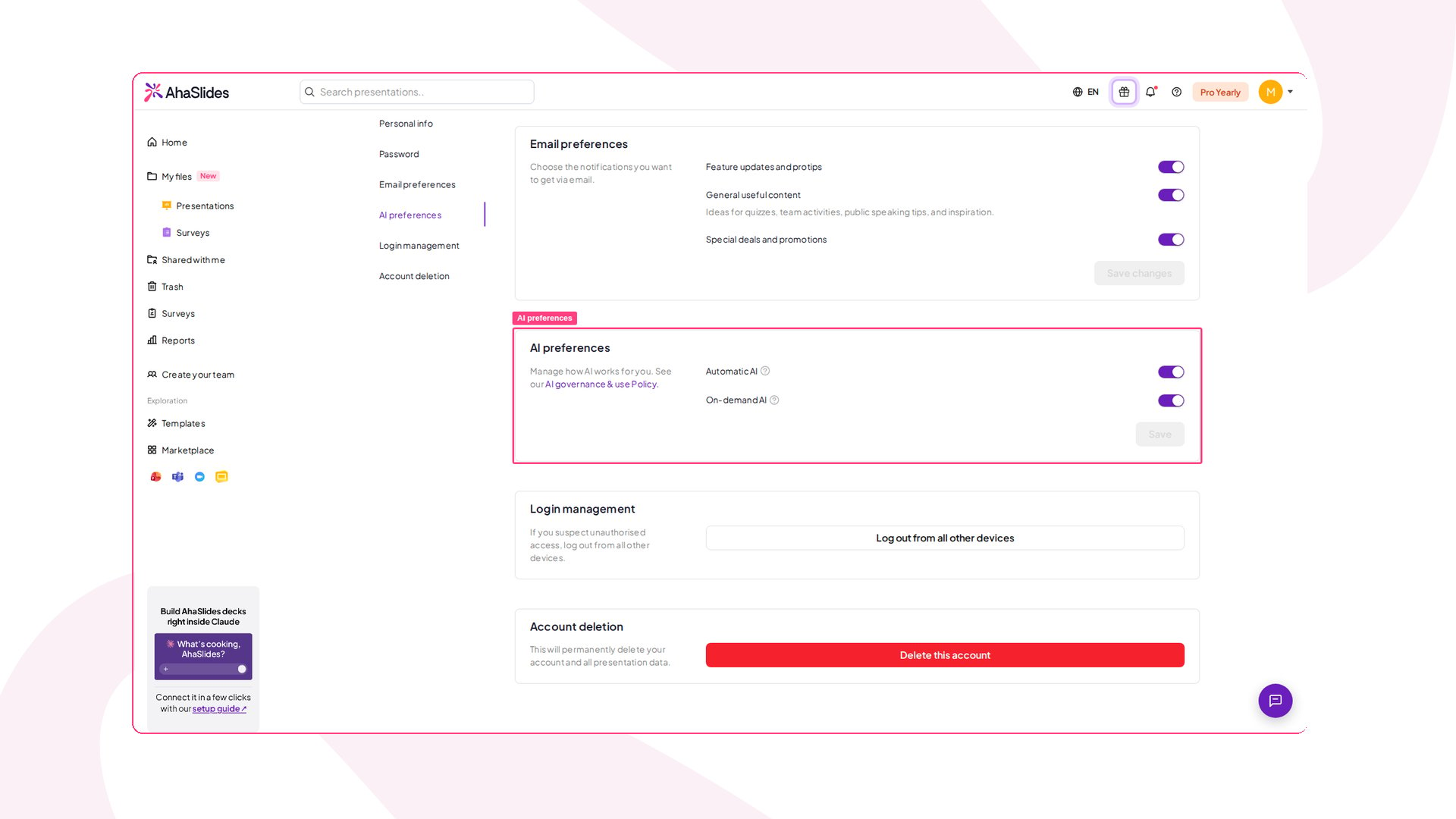
- Automatic AI — AI features that run automatically in the background, such as generating report insights and suggesting image-search keywords. Turn this off to stop AI running passively without any action from you.
- On-demand AI — AI features that run only when you trigger them, such as generating slide content in the editor or from Create with AI on Home, improving slide content, suggesting options for interactive questions, grouping responses while presenting, and Ask AI for reports and analytics. Turn this off to disable active AI interactions.
If your team admin manages AI
On a team plan, a team owner or admin can set AI preferences for everyone from Team Settings, in the AI preferences section, using the same Automatic AI and On-demand AI toggles. When an admin switches one off for the team, that toggle is locked in every member’s own AI preferences — you can still see it, but you can’t switch it back on. Disabled AI features then explain why on hover, with a message confirming that on-demand AI is managed by your team admin. For the full details on how AI is governed and used, see our AI governance & use Policy.AI in Surveys
Surveys follow the same On-demand AI setting as the rest of AhaSlides. There is no separate AI switch for Surveys, and turning Automatic AI off on its own does not affect them. When On-demand AI is off — whether you turned it off yourself or your team admin did — every AI starting point in Surveys is switched off:- Start from an idea on the Surveys dashboard
- Create with AI in the Survey editor
- The AI assistant panel in the Survey editor
- Generate with AI in the Survey slide inside a presentation
Surveys read the setting when you open or reload a Survey, and a change can take around 30 seconds to apply — so if you have just switched the toggle, reload the Survey tab. If AhaSlides can’t read the setting at all, Surveys treat AI as off rather than guessing.