

To share your presenting screen
1
Open your presentation
Open your presentation.
2
Click Share
Click the Share button on the top bar to open the sharing menu.
3
Click Embed
Click Embed in the menu. The Embed live presenting screen dialog opens.
4
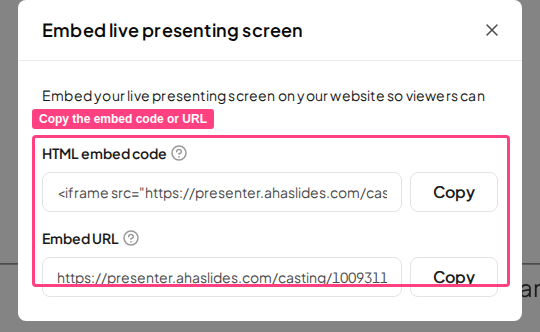
Copy the embed code or URL
You’ll see two options, each with its own Copy button:
- HTML embed code: an
<iframe>snippet you can paste into a website or any app that supports embedding. - Embed URL: a direct link to your live presentation that you can share or open in a web browser.
Ways to use a shared presenting screen
- Webinars & events: share a link with attendees so they can view the slides in their browser while you present.
- Website embedding: embed the live presentation on your website homepage or a landing page.
- Social media & communities: post the embed link on social platforms, forums, or community channels so followers can watch live presentations.
- Remote collaboration: display the presenter view on a secondary screen for co-presenters or team members.