

Lock submissions from the Edit view
1
Select the slide
Select the slide you want to lock submissions on.
2
Open the Content tab
Open the Content tab.
3
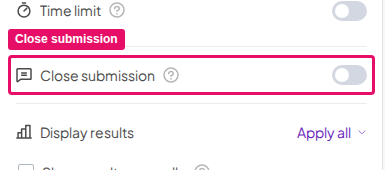
Turn on Close submission
Turn on the Close submission toggle. This disables submissions for that question. You can reopen them again later. To lock submissions on several slides at once, open the setting’s More actions (⋯) menu and choose Apply to all … slides for the same slide type, or Apply to all unscored slides. Lock submissions isn’t available on every plan; if yours doesn’t include it, you’ll be prompted to upgrade.
Lock submissions from the Presentation view
1
Click Close submission
While presenting, on the slide you want to stop submissions on, click the padlock toggle on the slide (its tooltip reads Close submission) or press the S key. The slide then shows Submissions closed. Like the Lock submissions toggle, the padlock isn’t available on every plan; if yours doesn’t include it, the padlock doesn’t appear while you present.
2
Reopen submissions
To enable submissions again, press the S key again or click the padlock toggle (its tooltip reads Open submission).