

How to turn on private mode for your presentation
While editing: click the Share icon in the top-right corner of the editor, open Visibility, then choose Private. Pick Public in the same menu to switch back.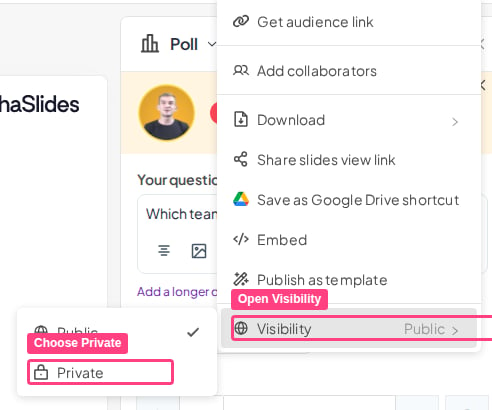
This control used to sit on a Public icon next to the presentation’s name. That icon can still appear in the editor, but it no longer switches the mode — use the Visibility section of the Share menu instead.
Frequently asked questions
The Public or Private icon next to my presentation's name does nothing. What should I do?
The Public or Private icon next to my presentation's name does nothing. What should I do?
The updated editor moves this control into the Share menu, and the icon beside the presentation name stops switching the mode even though it is still on screen. Click the Share icon in the top-right corner, open Visibility, and choose Public or Private there. This is not a plan restriction — private mode is available on every plan.