

Unlimited presentations
Create and save as many presentations as you like. Other free plan limits still apply — see what limits the free plan has below.
Live interactive sessions
Run live sessions and engage your audience in real time, from any device.
AI features
Use free AI assistance to generate engaging slides tailored to your needs.
Collaborative editing
Collaborate with friends and colleagues by letting them edit a presentation with you.
PowerPoint add-in
Insert interactive AhaSlides slides directly into your existing PowerPoint presentations with our PowerPoint Add-in.
PowerPoint & PDF import
Import your existing PPT, PPTX, and PDF files from PowerPoint or elsewhere into an AhaSlides presentation.
What limits does the free plan have?
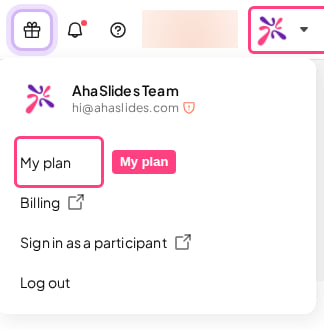
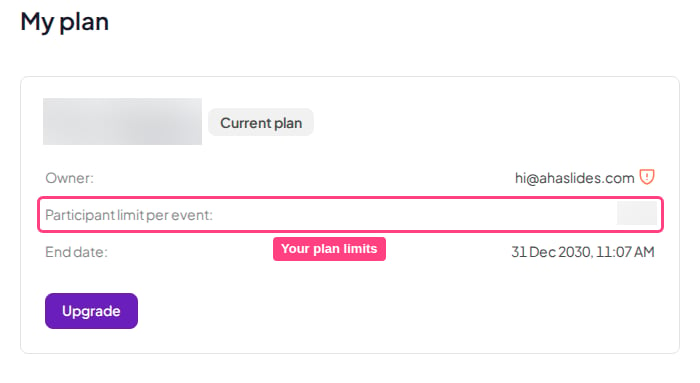
The free plan has some limits. To see them, you must open your own AhaSlides account. Your My Plan page shows your participant limit. Limits on how many quiz and unscored slides one presentation can include aren’t listed on My Plan: if a presentation goes over them, the Present button in the editor tells you. To check your free plan limits:- Log in to AhaSlides.
-
Open your My Plan page from your account menu.
-
Check your limits there before you build or run a live session.
Why can fewer people join than I expected?
The number of people who can join a live session depends on your account’s limits. That number can drop once your account reaches one of those limits. Open your My Plan page in your own account to see your limits and how much of each you’ve used. The participant limit counts the people connected to your live session at the same time, not everyone who joins over the course of the session. When someone leaves, their place is freed for someone else. Some free accounts also have a monthly participant allowance. If yours does, your My Plan page shows it as Participant limit per month, with how many you’ve used this month. It counts participants in your live, presenter-led sessions; self-paced presentations aren’t counted. The count starts again on the 1st of each month. If you go over it, you can keep presenting to your full audience for a short time, after which live sessions are restricted to a small, test-sized audience until the allowance resets or you upgrade. On a free account, if your presentation goes over the free slide limits, the live session is restricted to a small, test-sized audience. You can still run it to test on your own devices; to host a larger audience, reduce the number of those slides or upgrade. Accounts on a paid plan aren’t affected by this restriction. If you reach a limit while building or presenting, a prompt in the app tells you which limit you’ve reached and what you can do next. You can upgrade at any time to remove it straight away. The participant limit for a live session comes from the plan of the account that is presenting. If a paid-plan user shares a presentation with you and you present it from a Free account, the Free plan’s participant limit applies. Sharing a presentation does not share the owner’s participant limit with the person presenting. See Raising your participant limit. If you’re on a paid plan but only a few people can join, check:- You’re presenting while logged in to the account that has the paid plan.
- If your plan comes from a team, the team owner or an admin has given you a licence (the Licence column on the team’s Members tab shows Licensed) and the team’s plan hasn’t ended. Without a licence, your account has the Free plan’s limits.
- Your My Plan page shows your paid plan.