

How to cancel (turn off the auto-renewal of) your subscription
Monthly plans will renew automatically after 1 month, and Yearly plans will renew automatically after 1 year. We will send you a reminder email 2 weeks before your subscription is renewed. You can turn off auto-renewal anytime on AhaSlides, by using:1. The ‘Cancel subscription’ button on the My Plan page
If the Cancel subscription button isn’t showing, check the date line on the My Plan page first. When that line reads End date instead of Next billing date, your subscription is already cancelled: auto-renewal is off, and the plan stays active until that date. If the line still reads Next billing date and the button isn’t showing or doesn’t work, use the Manage payment button on the same My Plan page instead — see option 2 below.
2. The ‘Manage payment’ button on the My Plan page
If the button above isn’t showing, cancel through the billing portal instead. On the My Plan page, in the Billing & payment card, click Manage payment to open the secure Stripe billing portal, then follow the prompt to cancel your subscription. This turns off auto-renewal in the same way — you’ll keep full access to all paid features until the end of the period you’ve already paid for.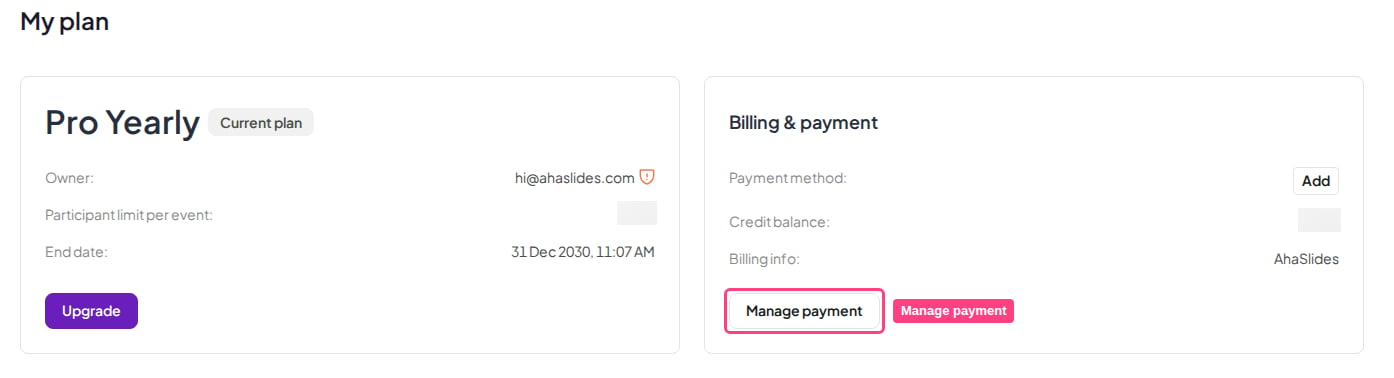
What happens to my presentations when my account is downgraded?
Nothing is deleted when you cancel. All of your presentations and all of the results you’ve collected stay in your account, exactly as they are, after your subscription ends. The only thing that changes is your access to paid features: once your plan ends, your account moves to the free plan, so you keep everything the free account includes and lose only the features that came with your paid plan.Frequently asked questions
Can I pause or freeze my subscription instead of cancelling?
Can I pause or freeze my subscription instead of cancelling?
There’s no pause/freeze option. To stop paying without losing anything, cancel (turn off auto-renewal): you keep full paid access until the current period ends, and then the account automatically drops to the Free plan.On the Free plan, you can still view your existing presentations and reports, and keep editing and presenting — the free-plan limits then apply to how large your live sessions can be (your My Plan page shows the limit that applies to you). Nothing is deleted; resubscribe anytime to unlock full paid-plan participant limits again.
How can I tell my cancellation went through?
How can I tell my cancellation went through?
A Subscription cancelled. message appears and tells you when your plan will stay active until. Back on the My Plan page, the Cancel subscription button is no longer shown, and the Next billing date line now reads End date.
Where can I see when my subscription renews?
Where can I see when my subscription renews?
On the My Plan page, a paid plan shows a Start date and a Next billing date. After you cancel, Next billing date becomes End date, the day your paid access finishes.