

Change your password
1
Open Account settings
On desktop, click your profile avatar in the top-right corner to open the account menu, then click your name at the top of the menu to open Account settings.On mobile, tap the menu icon, then under My account tap Account settings.
2
Go to the Password section
Scroll down to the Password section.
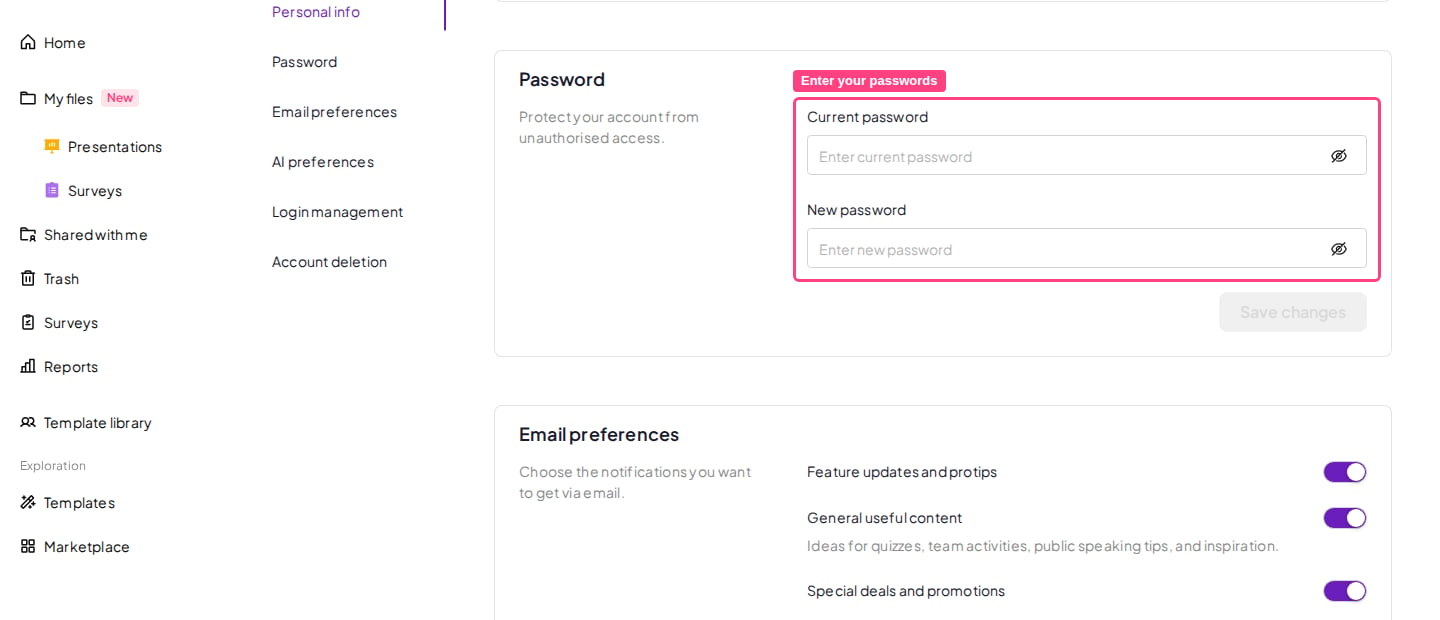
3
Enter your passwords
Type your Current password and New password. If you don’t remember your current password, select Forgot password? on the login page instead and follow Reset a forgotten password.
4
Save the change
Click Save changes.
Signed up with Google or Microsoft? Your account starts without an AhaSlides password, but you can set one yourself — you don’t need to contact support. Open your account settings the same way as in the steps above, go to the Password section, type a new password and save. You won’t be asked for a current password, because there isn’t one yet. After that you can sign in either with your email and your new password, or with the Google or Microsoft button as before.
Reset a forgotten password
1
Go to the reset page
2
Enter your email address
Type in the email address you signed up with.
3
Request the reset
Click Reset password.
4
Set your new password
Follow the instructions sent to your email to reset your password.
Didn’t receive the password reset email?
If the reset email hasn’t shown up after a few minutes, try the following before requesting another one:- Check your spam/junk folder — the reset email is sometimes filtered there, especially on corporate or school email accounts.
- Confirm you typed the right email — a typo or the wrong address (e.g. a work alias instead of your sign-up email) won’t match your account.
- Wait a few minutes and check again — delivery is occasionally delayed rather than lost.
- Search your inbox for “AhaSlides” rather than scrolling, in case it landed in a different folder or tab.
Enterprise single sign-on (SSO) accounts are the exception. If your organisation signs you in through SSO, the reset page will tell you to use the Single Sign-On option instead — password recovery is deliberately disabled for those accounts. Ask whoever administers your organisation’s SSO for help signing in. If you are that administrator, see Set up SSO and SCIM provisioning.